


Big Keyboard: Easy Homescreen
4.43.97K Reviews
App Specs
- Version
- 1.1.73
- Updated On
- License
- Free
- Downloads
- 1,000,000+
- Developer
- SwipeTap Apps
- Categories
- Personalization
- Platform
- Android
Screenshots
 Analysis by AppCompare
When I’m using a phone one-handed or trying to type quickly on the move, a small keyboard can turn a simple reply into a string of corrections. Big Keyboard: Easy Homescreen is aimed at that everyday irritation: it focuses on making the phone easier to navigate and text entry more comfortable, rather than adding a complicated set of tools. I see the appeal most clearly for people who regularly miss keys, find small controls tiring, or want a simpler home-screen experience.
What the app is trying to improve
This is a free personalization app from SwipeTap Apps, and its emphasis is practical rather than decorative. The name points to its most obvious attraction, but the broader idea is to make routine phone use feel less fiddly. Its current version is 1.1.37, and it has been available since December 21, 2023. The app is rated for Everyone, so it is presented as suitable for general audiences.
That focus matters because the usual alternatives solve different problems. A standard keyboard is often better if you want a familiar compact layout, while a feature-heavy keyboard may put themes, prediction tools, or other extras ahead of clear, spacious keys. This app makes more sense when reducing missed taps is more important to you than keeping every control small or squeezing maximum content onto the screen. I would treat it as a usability choice, not a general-purpose upgrade that every phone owner needs.
Where a larger layout can make a difference
The most convincing use case is not just someone composing a long message at a desk. Think of replying while carrying groceries, entering a quick search while standing in a queue, or typing with a thumb while walking only when safely stopped. In those moments, hitting the wrong letter can be more annoying than losing a little screen space. A more generous keyboard can make each tap feel less exacting, although it cannot remove the need to check what you have typed.
It may also suit someone who finds small touch targets uncomfortable because of vision or dexterity needs. A larger on-screen target can be easier to aim at, but I would not assume that a keyboard alone addresses every accessibility requirement. If you depend on specific assistive features, test the app alongside the phone’s built-in accessibility settings and your essential apps before making it your daily setup. The right fit depends on how the layout feels in your hands, not only on the promise of larger keys.
A useful way to judge it is to try the keyboard in the situations that normally cause mistakes. Send a short message, type a search, and enter text into an app you use often. Notice whether your accuracy improves enough to justify the extra space. If you mainly type with two hands and rarely miss keys, the default keyboard may already be the more efficient choice.
Making the switch work in daily use
Changing keyboards can feel like a bigger decision than installing a regular utility, because the keyboard appears across many parts of the phone. I would make the change deliberately: first learn how to switch between keyboard options on your device, then try the larger layout in low-stakes tasks before relying on it for something urgent. Keeping the familiar keyboard available gives you an easy fallback if a particular screen or app feels cramped.
Worth Reading Before You Choose

EA SPORTS FC Mobile 26 Is a Bigger Football Game, but It Takes Time

Flipboard Shows What News Apps Must Do Beyond the Feed

Switching to Android Auto Means Rethinking Your Driving Routine

Google Calendar Makes a Crowded Week Easier to Manage

Ludo King Makes the Most of the Minutes Between Plans

Baby Panda World Brings Quick Play to Modern Phones, but Its Game Library Feels Busy
There is a practical trade-off here. A keyboard that occupies more of the display can make typing easier, but it leaves less room to see the conversation or form field above it. That can be especially noticeable when editing a longer message, where you may want to review several lines while the keyboard is open. A sensible workflow is to draft in short sections, hide the keyboard when reviewing, and only then send. It is a small adjustment, but it helps balance bigger targets with limited screen space.
For someone who shares a phone or switches between different typing habits, the ability to return to a regular keyboard is also worth considering. A wider layout may be comfortable for deliberate typing but less convenient when you need to glance at a screen and tap a quick response. I would not force one arrangement into every situation. Use the larger option when accuracy and comfort matter most, and keep the usual layout as an alternative when space or speed matters more.
Why You’ll Love It
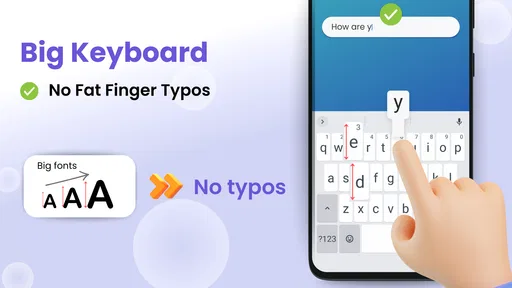
So, what's the big deal with Big Keyboard: Easy Homescreen? Well, as the name suggests, it’s all about making your typing experience a whole lot easier. The app transforms your standard keyboard into a larger version, which is a total game-changer if you often find yourself hitting the wrong keys.
The installation is super simple. Just download it from your app store, and you’re ready to roll. Once installed, the app integrates seamlessly with your phone, allowing you to switch between your regular keyboard and the bigger one effortlessly. No complicated setups or tech wizardry needed!
Features You Can’t Miss
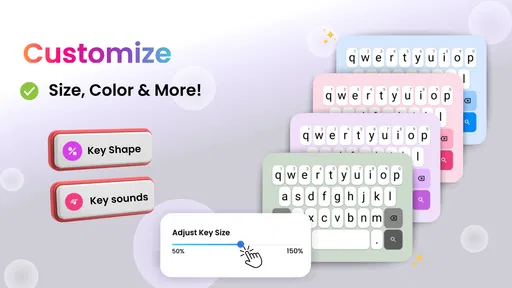
One of the coolest features of this app is the customization options. You can adjust the size of the keys to fit your needs. Whether you have a big screen or a small one, the flexibility here is fantastic. Plus, the app doesn’t just make the keys larger—it also improves the layout for a more intuitive typing experience. Typing out long messages feels like a breeze.
Another neat feature is the accessibility it offers. For those with visual impairments or motor difficulties, this app is a blessing. It’s designed to be inclusive, making sure everyone can communicate easily without the frustration of tiny keyboards.
Getting Used to the New Setup
Now, I know what you’re thinking—won’t a bigger keyboard take up too much screen space? Well, initially, you might need some time to adjust to the new layout. But trust me, once you get the hang of it, you’ll likely never want to go back to the standard keyboard.
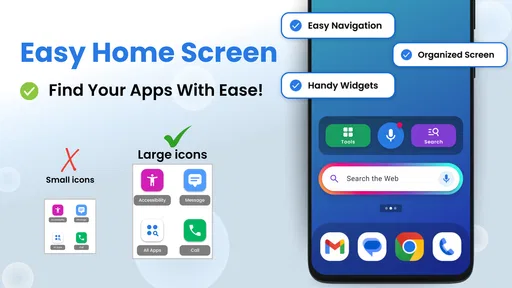
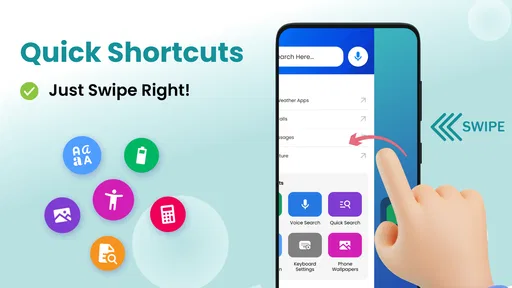
The app also includes a handy homescreen widget, which is a lifesaver. It allows you to access the keyboard quickly without diving into the app settings. This feature is all about convenience, and who doesn’t love that?
How it compares and what to keep in mind
With an average rating of 4.5 from around 26,000 ratings, and over a million installs, this app has found an audience among people looking for a more accessible phone layout. Those figures suggest it is not an obscure experiment, but they do not tell me whether its particular keyboard will suit your hands or your screen. I would put more weight on a short personal trial than on popularity, especially if you have already settled into another keyboard.
The app’s main trade-off is inherent in its purpose: enlarging keys means giving up some visible screen area. A compact alternative can be better for landscape use, split-screen work, or small displays where every line of a message matters. Likewise, if your chief frustration is predictive text, autocorrect, or multilingual typing, compare those specific needs before switching. A larger target helps with aiming; it does not automatically make every part of typing smarter.
One non-obvious tip is to evaluate it in both bright and dim environments. Key size that feels comfortable at home may feel different outdoors, where glare or hurried use makes visual separation more important. I would also test punctuation and number entry, not just ordinary sentences: messages often involve names, addresses, or codes, and the layout needs to remain manageable when you leave the alphabetic keys. These checks help reveal whether the bigger arrangement supports your real habits rather than only a quick first impression.
Who should try it—and who may prefer another setup
I’d recommend giving it a try if small keys regularly slow you down, if you tend to type with one thumb, or if a family member would benefit from more forgiving touch targets. It is also a reasonable option for someone who wants a simpler, more approachable phone interface and is willing to spend a little time getting comfortable with a different layout. Since it is free, trying it does not require a purchase decision, though the everyday value still depends on whether it feels right on your device.
I would be more cautious if you have a small screen, rely on a highly customized keyboard routine, or prefer to see as much of a chat as possible while composing. People who rarely mistype may find that a larger keyboard solves a problem they do not really have. And if accessibility is essential, regard the app as one possible aid rather than a substitute for testing the complete set of tools you depend on.
There are a few sensible questions to answer before making it permanent. Does the keyboard feel comfortable after several minutes, not just a few taps? Can you return to your previous keyboard when a task calls for a compact layout? Does the homescreen access fit naturally into how you already open and use your phone? Trying those steps with a message, a search, and a longer entry will give you a clearer answer than installing it and judging by appearance alone.
Final Thoughts
All in all, Big Keyboard: Easy Homescreen is a must-have if you’re tired of tiny keys and constant typos. It's especially great for anyone who struggles with standard keyboards or just wants a more comfortable typing experience. The app is straightforward, effective, and genuinely enhances how you use your phone. Give it a shot and see how it transforms your typing game!
If you're interested in trying it out, you can easily find it on your app store. Happy typing!
What I’d watch for over time
The current version is 1.1.37, which gives existing users a concrete point of reference when thinking about the app’s ongoing development. I would avoid assuming that a version number alone means a particular feature has changed; the useful test is whether the keyboard remains comfortable and dependable after updates. If you already use it, notice whether your usual tasks still feel smooth, and keep your fallback keyboard available while you decide whether a new release suits your routine.
My overall advice is simple: choose this app for a specific, recurring difficulty with small keys, not just because a bigger keyboard sounds appealing. If it reduces corrections in the messages and searches you actually make, the screen-space compromise may be worthwhile. If it makes browsing or reviewing text harder, switching back is a perfectly good outcome. That balance is what will tell you whether this personalization app earns a place on your home screen.
Pros
- User-friendly interface for quick navigation.
- Customizable themes enhance personalization.
- Supports multiple languages seamlessly.
- Large keys reduce typing errors significantly.
- Integrates smoothly with existing apps.
Cons
- Limited advanced features for power users.
- Occasional lag on older devices.
- Ads can be intrusive at times.
- Doesn't support gesture typing.
- Limited emoji options compared to competitors.
FAQs for Big Keyboard: Easy Homescreen
What are the main features of Big Keyboard: Easy Homescreen?
Big Keyboard: Easy Homescreen offers a user-friendly interface tailored for those who prefer larger keys and icons on their devices. It provides customizable themes, adjustable key sizes, and a simplified homescreen layout to enhance accessibility. This app is particularly beneficial for users with visual impairments or those who find standard keyboards too small.
Is Big Keyboard: Easy Homescreen compatible with all Android and iOS devices?
Big Keyboard: Easy Homescreen is designed to be compatible with most Android and iOS devices. However, it's always best to check the app's compatibility with your device's operating system version before downloading. Updates to the app may enhance compatibility with newer devices over time.
Does Big Keyboard: Easy Homescreen offer any customization options?
Yes, the app provides extensive customization options. Users can adjust the size of keys and icons to fit their preferences. Additionally, it offers various themes and color schemes, allowing users to personalize their experience further. This customization ensures that the app can cater to a wide range of user needs and preferences.
Is Big Keyboard: Easy Homescreen secure to use?
Big Keyboard: Easy Homescreen is designed with user security in mind. It does not collect personal data or track usage without permission. As with any app, users should review the permissions requested during installation and ensure they are comfortable with the data access required for optimal functionality.
Does Big Keyboard: Easy Homescreen support multiple languages?
Yes, Big Keyboard: Easy Homescreen supports multiple languages, making it accessible to a broader audience. Users can select their preferred language from the app's settings, ensuring that the keyboard and homescreen functions are in the language they are most comfortable with.


